Article
How many pixels does a wall-sized panorama need?
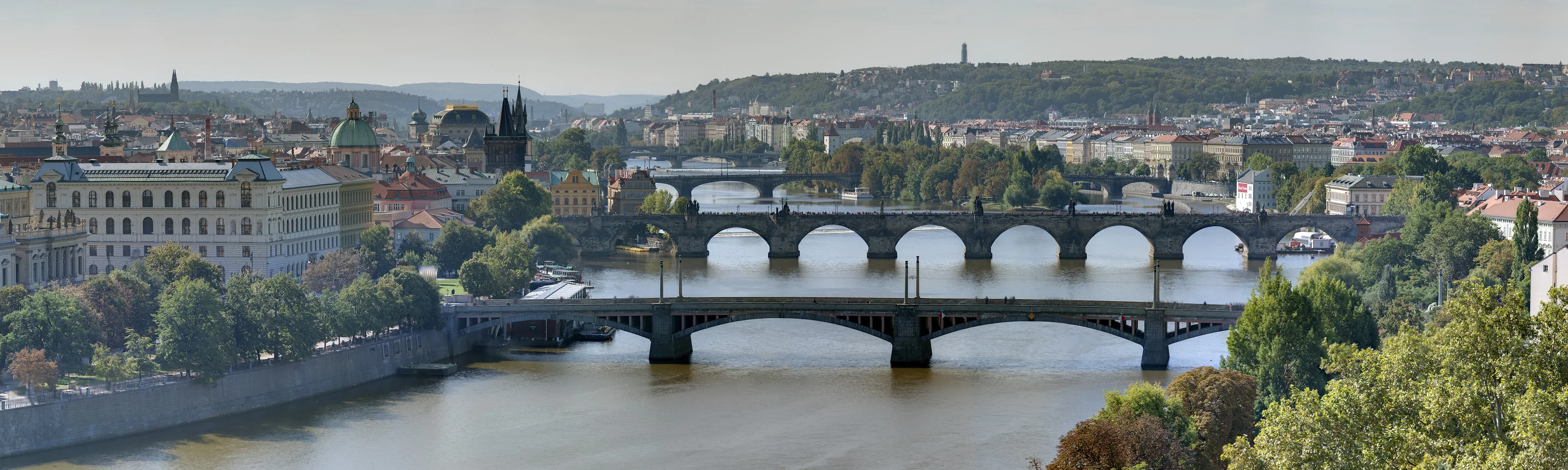
I stitched the Prague panorama from 896 frames shot with a 500 mm telephoto lens: 128 positions, each in 7 exposures. It has 357 megapixels and, at full quality (300 ppi), prints 2.9 m wide. Is that a lot or a little? It depends on how far away you are when you look at it.
-
128 positions in a grid
A 500 mm telephoto lens takes in only a small slice of the view in each frame, so I shoot the view row by row and column by column.
-
7 exposures at each position
From the darkest, in which the sky and reflections are not blown out, to the brightest, which brings out the shadows.
-
896 frames, or 7 panoramas
Frames of the same exposure stitch into a complete panorama: 7 precisely aligned panoramas, each with a different brightness.
-
1 final image
Special software blends them into one. The image gains both sharpness and dynamic range.
Short answer
For a print of a given size, what matters most is how close people will get to it. With normal eyesight, this is what a 3-metre print of the Prague panorama needs:
| Viewing from | Print density | Resolution needed |
|---|---|---|
| 3 m (you see the whole picture at once) | 29 ppi | about 3.5 MP |
| 1 m | 87 ppi | about 32 MP |
| 30 cm (up close, as when reading) | 291 ppi | about 350 MP |
The Prague panorama has 357 megapixels, so it holds up even when you walk right up to it. You can explore the whole panorama at full resolution on the Large-format panoramas page.
How much detail the human eye can see
An eye with normal acuity can tell apart two points about one arcminute apart. At one metre that is 0.29 mm. For a print’s pixels to stay invisible they must be smaller than that, so at least 87 of them must fit into an inch (25.4 mm). In general: density needed in ppi ≈ 87.3 / distance in metres.
Younger people and people with very good eyesight resolve even finer detail. For demanding prints, a stricter criterion of half an arcminute is therefore also used, which doubles the density needed.
DPI, PPI and the 300 DPI myth
PPI is image pixels per inch of print; DPI is the dots a printer lays down. You often read that a print needs 300 DPI. What that really means is 300 ppi, which matches a viewing distance of about 29 cm, as when you hold a photo in your hand. For a picture nobody gets closer to than a metre, that is far more than it needs.
So why do I shoot hundreds of frames?
If tens of megapixels are enough for a wall viewed from a metre, why shoot hundreds of frames? Because people walk up to a big picture: from a distance they take it all in, then they step closer to look for places they know. A large panorama also lets you print a crop, say a single district, still at full quality.
And on screen you can zoom in to individual pixels. Record-size panoramas are made mainly for that, not for printing.
How I photographed Prague with a telephoto lens
A 500 mm telephoto lens takes in only a small slice of the view in each frame. So I divided the view into a grid of 128 positions, row by row and column by column, and took 7 frames at different exposures at each of them: 896 frames in all.
That effectively makes 7 precisely aligned panoramas, from the darkest, in which the sky and reflections are not blown out, to the brightest, which brings out the shadows. Special software blended them into one image of 34,500 × 10,343 px, which gained both sharpness and dynamic range.
How hundreds of frames become one picture
First the software finds common points where neighbouring frames overlap and works out how the camera was pointing for each frame. Then it stitches the frames of each exposure into one panorama, all 7 with the same geometry, and finally blends the layers: for every part of the image it takes the exposure that renders it best.
One layer of the Prague panorama has 357 megapixels, over 2 GB at 16 bits per colour channel; all 7 layers come to about 15 GB of image data. That is why I stitch on my own workstation, built for this kind of work.
Zoom on the web: why the panorama loads in tiles
Held in a browser’s memory, the whole panorama would take up over 1 GB, more than a phone can handle. So on the web it is cut into tiles of 512 × 512 px at 17 zoom levels, from the whole view down to full resolution; Prague has 1,956 tiles, Mladá Boleslav 1,908. The viewer downloads only the ones you are looking at, so even 357 megapixels load quickly.
The panoramas are online in their original form. I blurred only the spots where a particular person could be recognised or a number plate read: in Prague, for example, people close to the camera on the embankment and on Mánes Bridge, and tourists on the gallery of the Old Town Bridge Tower. The full-resolution tiles carry a subtle repeated janlochmann.com mark, and the viewer adds “© janlochmann.com” in the corner of the image.
Want a panorama across a whole wall?
Tell me how big the wall is, how close people will get to it and the view you have in mind. I’ll work out how many pixels the wall needs and suggest a crop of the panorama.